
Geek Fantasy
Game Description:
Geek Fantasy is an adventure RPG game. The game player wakes up in his dormitory, to find himself in the college he once was in.
In the adventure, he encounters all kinds of unknown creatures, each of which could have easily "plunder" his body. He can only continue exploring and try gaining more power in order to kill the final boss, and finally graduate from that school.
In this school where danger is lurking at every corner, where are all the unknown creatures hiding? Is there anyone who can help him escape faster? How powerful is the formidable final boss? In this labyrinth of mystery, the truth will slowly reveal itself through step by step interaction and exploration. Of course, do be careful. Do not get injured by the unknown creatures.
Game Features:
-
The protagonist can move by two modes: walking and driving.
-
Pixel-style images and music, a retro style evoked childhood memories.
-
Suitable for player that good at observation and dare to try.
-
Interactive NPC, different kinds of creature, inventory box, many items for exploration.
-
Save and reload the game.
Game Instruction:
Step 1
Double click to open the folder you have download, then double click to open the application (.app file for mac, .exe file for window). Select your desired resolution and click play to open the game.

Step 2
Start the game and click on ‘start’ button. Read the introduction and press 'C' to begin.

Step 3

Press ‘W’, ‘S’, ‘A’ and ‘D’ on the keyboard to move the character up, down, left and right respectively. Double press ‘W’, ‘S’, ‘A’ and ‘D’ to allow the character change to running mode. After walking out of the dormitory, the character will land on the main map.
To get the help of how to control the figure, click on ‘controls’ bar located on the upper right of the scene. After reading, click on the “close’ bar to continue with the game.


The parking lot is located at the lower left portion of the main map. You can drive the car to increase the moving speed of the character. To drive a car, you should move the figure close to the car and press 'F'. The figure will move inside the car. If you press 'F' again you will get off. After getting in the car, you can press 'W' to move the car forward, or press 'S' to move the car backward. You can press 'W'+'A' together to make the car turn toward left, or press 'W'+'D' together to make the car turn towards right, or press 'S'+'A' together to reverse the car towards left, or press 'S'+'D' together to reverse the car towards right.

All of the buildings are designed with a door. You can simply walk in the door and now the character is landed on the indoor map. You can walk around and find the NPCs(non-player-character) and enemies inside.
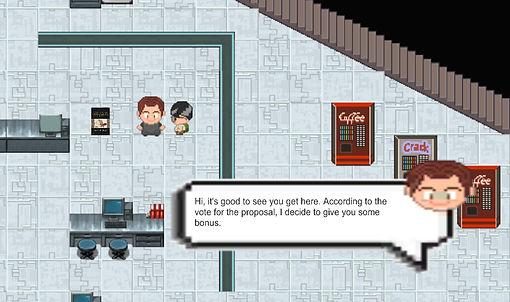
To interact with the NPC, simply press ‘T’ and communicate with him/her. He/She will give you something to improve either your attack power or your score.
To use the inventory system, press 'Q' to open the inventory. Then press 'A' and 'D' to change the chosen item. If you want to use the item, press 'space'. Also, you can pick up the items on the map by touching it.

There will be items design as book for you to pick-up. Use them to give you a different attack mode. The black book will give a new ability, you can then press 'R' to attack. The white book will update your current attack mode from single attack to range attack. In addition, there will be heal item design as heart, when you use it, you will gain more life points.
To eliminate unknown creatures, walk near and face towards it. Press space bar on the keyboard to release the bullet. Be careful not to walk too closed to prevent getting injured.


Finally, the boss is located at Davis Hall, which is designed to settle at the upper right of our map. You should kill all the enemies and collect 7 keys to unlock the door of Davis Hall.
‘Game Over’ will be displayed if you die due to injury.
‘You Graduate’ will be displayed after you eliminated the final boss.

To start a new game, pause, save, reload or quit, click on the ‘menu’ bar located on the upper right of the scene, then choose your option and click on it to achieve the option you want.

Here is the link to the issue page:
In the issue page, you can click on the New issue button at the right side to create a new issue with a Title and leave a comment. Then, you can find the Labels option at the right side, and label it as type bug. Finally, submit new issue.
Additional Information:
-
You should click the control menu on the right top to check on how to play.
-
You can control the player to walk around all the maps to check the collision system (for example if you can walk through a wall, a poll or any unreasonable objects, it would be considered as a bug).
-
You can find the sport car to check the driving system.
-
You can find the items (books, hearts) on the map and check the inventory system.
-
You can try to attack the enemies to test the battle system.
-
You can control the player to walk through the door to check the scene switch, there is also a fading in and fading out effect.
-
When you next to the professor NPC(non-player-character), you can press T to have a conversation with them as well as gain points.
You can download our game in the google drive. We provide two versions for both Windows and MAC OS. Please click the button below for downloading. Enjoy it!
If you find some bugs or have any suggestions, please leave your feedback for us by clicking the button below.